Install PhpMyAdmin with Nginx on Ubuntu 18.04
PhpMyAdmin is the most popular web interface for MySql whereas nginx is becoming a popular choice for web server. Here we will be going thourgh the process of setup a PhpMyAdmin instance with Nginx, in an Ubuntu 18.04 server. The steps may vary slightly for other ubuntu versions.
Setup PhpMyAdmin
- We are assuming php, mysql, nginx are already installed in the Ubuntu system
- Install PhpMyAdmin
sudo apt-get install phpmyadmin - During installation, below screen will appear & ask to choose web server
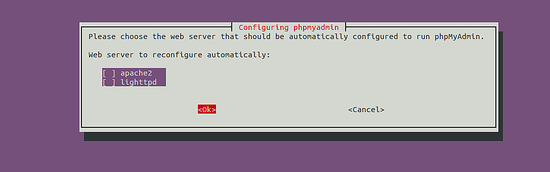
As we will be using Nginx as web server, don’t select any of the options & enter “Ok”
- In next steps, a new database user for PhpMyAdmin will be created & a database named ‘phpmyadmin’ will be created as well
- After successful installation, phpmyadmin folder can be found at
/usr/share/phpmyadmin. We will create a symlink to/var/www/htmlusing following commandsudo ln -s /usr/share/phpmyadmin /var/www/html/phpmyadmin
Create Nginx Server Block
- Create a server block file for phpmyadmin at
/nginx/sites-available/phpmyadmin& put below contentserver { root /var/www/html; # Add index.php to the list if you are using PHP index index.php index.html index.htm index.nginx-debian.html; server_name ***.**.***.*; location ~ \.php$ { include snippets/fastcgi-php.conf; fastcgi_pass unix:/var/run/php/php7.2-fpm.sock; fastcgi_param SCRIPT_FILENAME $document_root$fastcgi_script_name; include fastcgi_params; } } - Test nginx configuration by running
sudo nginx -t. If no error found, restart nginx bysudo service restart nginx - The phpmyadmin web interface will be available at
[Your_IP]/phpmyadminweb address
Change name of PhpMyAdmin folder for security
- As automated hacking attack can target the url [IP]/phpmyadmin, it is better practice to use some other name instead of phpmyadmin in the web link.
- To do this, simply change the folder name in
/var/www/htmlby commandsudo mv phpmyadmin mydb - After that the interface will be available at
[Your_IP/mydb]web address
Footnote
- There are many more steps regarding setup of Phpmyadmin with mysql & nginx, related to security & best practices. Please follow those as seem fit.